Executive Summary :
To send pictures to a Smugmug account (A) attach picture to email,
(B) password in subject line,
(C) send to "whateversmugmugnickname@email.smugmug.com"
Example: lsm@email.smugmug.com or donredding@email.smugmug.com
(D) If needed, see instructions below.
----------------------------------------------------------------------
We have the pictures of Alexa on Linda's Smugmug at click here or go to:
http://www.smugmug.com/gallery/14787762_8dHPF#1102742290_sJSsx
--------------------------------------
Here is Example of how I can use email to send to my Smugmug:
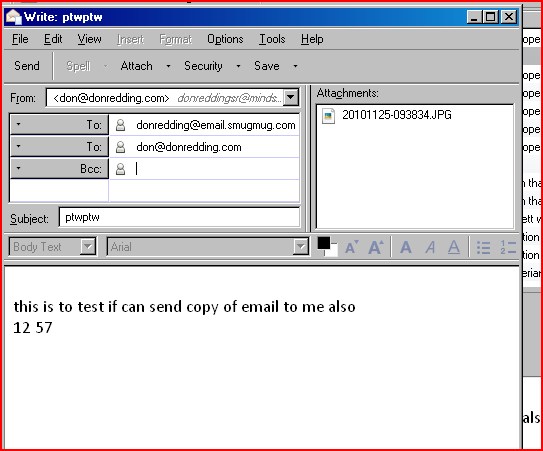
Instructions: How to send pictures to Smugmug from your phone or by emailing from your computer (my wording).
(Click here for the official Smugmug Help instructions)
- To send to Linda's Smugmug account or don's Smugmug account, address your email to:
- donredding@email.smugmug.com
- lsm@email.smugmug.com
- Put the appropriate password (which you need to get from Smugmug account owner) in the subject line (Linda and I have the same password for your ease in remembering -and emailing to both of us -, but different accounts.)
- Attach the picture or pictures
- Limits are huge: 12mg for Linda, 64 mg for me, per picture. (Linda has "Basic" Smugmug, I have the "Pro")
- Your email program might have limits
- I do not know maximum one can send at a time but several I know.
- You can address to both accounts of ours at same time, just be sure the password (only) is in subject line.
- In addition, you also address same email to a regular email address to let the person know an attemppt is being made to send the picture to Smugmug.
- (from Smugmug help - repeats some of above)
Compose an email containing one/several photos or attach the photos to the email and send to yournickname@email.smugmug.com . Example: donredding@email.smugmug.com or lsm@email.smugmug.com or beanland@email.smugmug.com.
Type your photo email password into the subject line. Type the photo's caption into the body of the email (optional).

- Send. SmugMug will automatically create a gallery named "email" and place your photos in it.
Ask a real person at Smugmug about sending pictures.
7. An "Email" gallery is established in the "Other" Category if not already there.
8 . The Smugmug Account Owner can move the "Email" gallery elsewhere but will have new address
9. To check to see if your pictures made it up to the Smugmug account for Linda or me, go to appropriate link, give it a few seconds after sending up.
Links: For Linda, click here or
http://lsm.smugmug.com/Other/Email/14826875_ZFacU#1106148691_rU6Mg
or
For Don, click here or
http://donredding.smugmug.com/Other/Email/13160333_aiEMG#954739185_nP6d6
10.Let me have any questions.
11. Here is info I prepared on why I like Smugmug so much:
